
Visual BACnet uses the standard BACnet ports BAC0 to BACF (47808-47823) when decoding for BACnet packets. If your capture contains BACnet packets on one or more non-standard ports and you would like Visual BACnet to decode them during the analysis, you may specify these additional ports in the settings before uploading your files. Note that you must add these ports before uploading the file, for Visual BACnet to analyze all of your BACnet traffic.
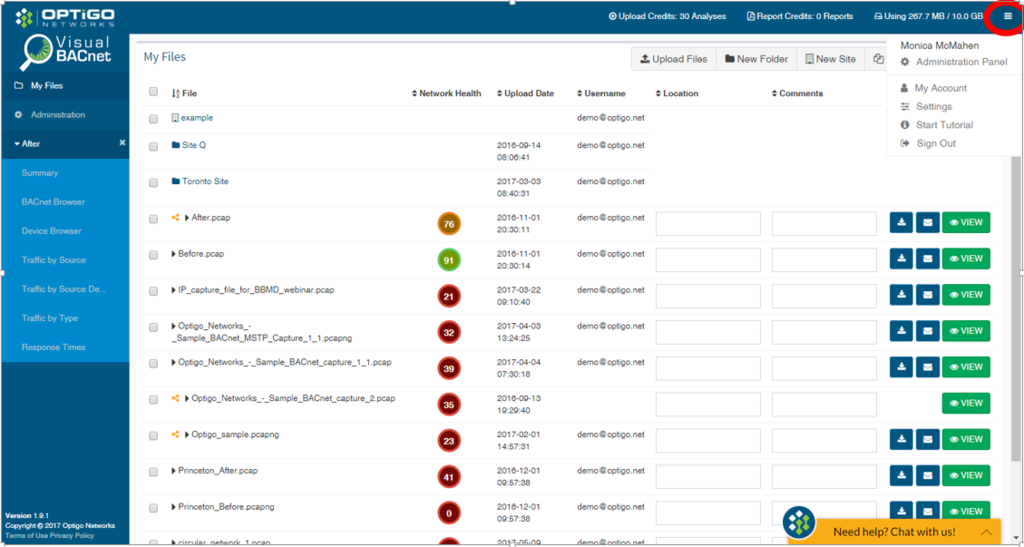
First, click the dropdown menu in the top right hand corner, and select Settings.
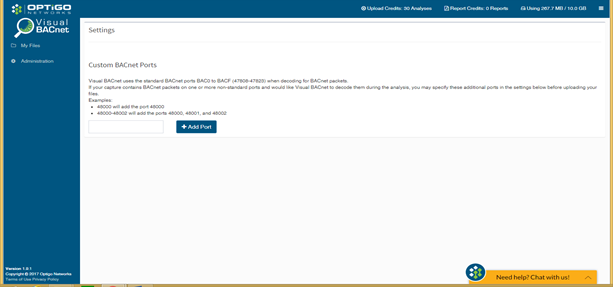
You will arrive on a Custom BACnet Ports page. Here, you can add any non-standard BACnet ports that are on your network. Make sure you enter the numbers correctly: entering 48000 will add the port 48000, while 48000-48002 will add the ports 48000, 48001, and 48002. Click +Add Port when you are done entering these numbers.
Now drag and drop your PCAP file into Visual BACnet and find out how your system is doing.
Comments
0 comments
Please sign in to leave a comment.