
In order to use Visual BACnet, you will need a packet capture file, or pcap, file. Packet capture can be created using Optigo Capture Tool or using Wireshark, an open source application. The easiest is to start packet capture on the server running the building management software. This will typically get a complete system-level view of the Building Automation System (BAS). All global broadcast messages, communication with the BAS, and general network traffic.
If using Wireshark, it is recommended to set the capture filters to "udp portrange 47808-47823" to avoid non-BACnet packets which can sometimes contain sensitive information.
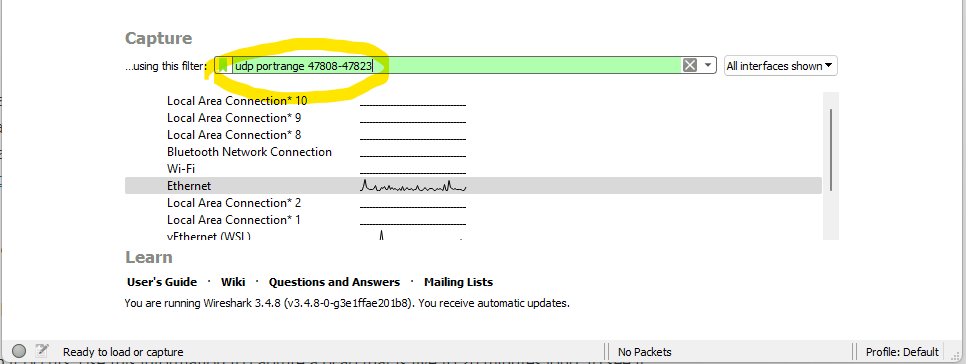
For a step-by-step, watch this video:
As a secondary step, you can also perform captures on each individual MS/TP network. This will capture all MS/TP traffic between controllers and devices that may not be seen by the BAS and higher level network. Analyzing this capture in Visual BACnet will expose any problems arising from token passing. Learn how to capture MS/TP traffic.
The optimal capture length will be dependent on the intended use of the pcap file.
To get a general system health check — perhaps after commissioning, before starting a job, or for regular audits — we recommend a one-hour capture.
Once a problem is identified, shorter captures can be used to troubleshoot. By initially looking at the longer pcap, you should be able to identify the cause or the frequency of the problem, or the time of day during which it occurs. Use this information to capture a pcap that is five to 20 minutes long, to see if your work fixed the problem and increased the network health. In some cases, it may be good to force a command or action during the capture period to ensure the fix is applied correctly (e.g. confirm reply on read-property is no longer an error).
|
Intended use of Visual BACnet |
Recommended capture length |
|
General system health check |
1 hour |
|
Troubleshooting and validating fix |
5-20 minutes |
If you are using Visual BACnet for a particular problem, ensure that the action or commands triggering the problem occur during the capture period. Note that some BAS and controllers include a packet capture feature, which are easy to use and require no additional software or hardware. Please ensure the capture file has an extension of .cap, .pcap, or .pcapng. If it does not by default, append a .cap before uploading to Visual BACnet. We recommend performing regular checks on your network’s health — monthly, weekly, or daily if possible — to ensure the system is running smoothly.
Comments
0 comments
Please sign in to leave a comment.